






Best enterprise DAM software in 2026: Features, ROI & comparison

Mar 24, 2025
10 min
Updated April 21, 2026
Enterprise digital asset management (DAM) software has become crucial for large organizations striving to maintain control over their digital assets. As companies grow, so does the volume and complexity of the assets they need to manage — images, videos, documents, creative files, presentations, logos, and marketing materials, to name just a few.
Unlike basic DAM systems, enterprise-level solutions address the specific needs of large-scale businesses. They offer powerful tools for metadata tagging, version control, workflow automation, and rights management. This allows organizations to enhance productivity, maintain brand consistency, and ensure assets are accessible and secure across all platforms.
According to the State of AEC Marketing Report, larger firms, particularly enterprises, tend to pull content daily, suggesting higher demand and more extensive internal communication needs.
Fortunately, enterprise DAM software meets this demand by providing a streamlined, centralized solution tailored to large organizations with complex workflows and high-volume asset management requirements.
What is enterprise digital asset management software?
Enterprise digital asset management software is a powerful tool that helps large organizations efficiently store, organize, share, and manage various digital assets. These assets include images, videos, documents, audio files, creative files, presentations, logos, marketing materials, and more.
With enterprise DAM systems, companies can centralize their digital content, making it easily accessible, secure, and consistently utilized across various departments and platforms.
Unlike standard DAM solutions, enterprise DAM software is built to handle the complexity and scale of large organizations. It offers robust tools for metadata tagging, version control, rights management, and workflow automation. This comprehensive approach ensures seamless collaboration, efficient distribution of assets, and adherence to brand standards.
While many companies offer DAM solutions, enterprise DAM software is specifically perfect for large-scale businesses with unique needs.
The benefits (and pitfalls) of enterprise DAM: Why enterprise companies need DAM software
Enterprise companies need DAM software to provide a single source of truth for sorting, storing, sharing, and securing digital assets. This centralized approach ensures that operations across your business — whether they be marketing, branding, business, development, or otherwise — can access and use assets in an efficient, streamlined manner.
“I know in my role I can’t live without this tool [DAM]. We have confidence in where everything is and that it’s the best version to use. It saves so much time and so much frustration that we previously had with file setups and searching and not trusting old imagery. The confidence we now have is worth every bit of the transition. We never felt like we were trying to figure it out and make it all happen on our own. And that seamless integrated team effort is what really makes everything work.”
—Adria Klein, Asset Coordinator, Robins & Morton
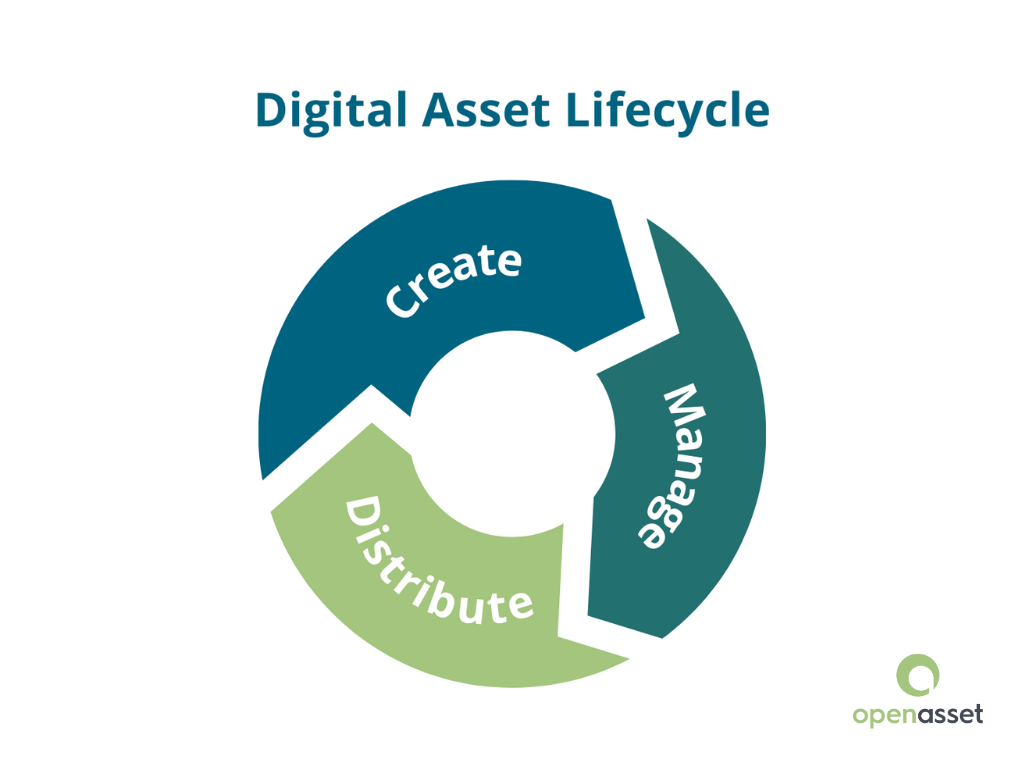
The benefits of enterprise digital asset management software extend beyond simple organization and storage. It empowers enterprises to strategically manage their entire digital content lifecycle, from creation and categorization to efficient retrieval and distribution.
However, that doesn’t mean that DAM systems are perfect magic solution to all your problems. Even the best enterprise digital asset management software comes with its pitfalls.
Here are some of the benefits of enterprise DAM software, along with some of the related pitfalls to watch out for:
Improved productivity and operational efficiency
Enterprise DAM solutions improve workflow efficiency by automating asset tagging, categorization, and version control. Automated processes ensure assets are easily searchable, correctly organized, and quickly accessible, saving time and reducing human error.
With approval workflows integrated directly into the DAM system, teams can review and provide feedback within the platform, speeding up approval cycles and reducing time-to-market for projects.
For example, during a product launch, marketing teams can upload promotional materials to the DAM platform for automatic tagging and categorization.
Stakeholders can review and approve assets directly within the system, eliminating the need for lengthy email chains or meetings. This allows companies to enhance productivity and gain a competitive edge.
Common pitfall: Implementation & onboarding
While DAM solutions improve productivitiy and efficiency once implemented, companies often underestimate the time and energy it can take to get them set up and running. Transferring and categorizing assets, teaching your team how to use the DAM, and ensuring all teams are aligned with how, why, and when to use the new system can take weeks to months. Convincing your team to migrate to a completely new asset management system can also be challenging. If onboarding isn’t thorough, you risk implementing another piece of software that no one actually uses months or years down the road.
Enhanced brand consistency
Maintaining brand consistency is critical to building consumer trust and brand loyalty.
According to Forbes, “With off-brand content being produced, brands risk providing an inconsistent experience for their customers and miss out on the opportunity to reinforce their brand values.”
This is where enterprise DAM systems come in. An enterprise digital asset management system helps organizations achieve brand consistency by centralizing brand assets like logos, fonts, templates, and marketing materials.
Marketing teams across different regions can draw from a unified repository of assets, ensuring a consistent brand identity across all channels and platforms. This easy access to approved assets allows content creation to align with established brand guidelines.
Such consistent presentation strengthens brand recognition, fosters customer loyalty, and helps avoid the confusion caused by off-brand communications.
Common pitfall: Unclear governance
Without clear governance policies surrounding who can upload, approve, or archive assets, brand consistency can still break down. Making sure everyone is on the same page regarding where to put assets is also crucial. If one person is uploading V1 of a logo in one area while another person is uploading V3 in another, a DAM system can become just as messy as an ad-hoc system of personal and public drives. Ensuring your team has clear rules about where, how, when, and who can upload is crucial to an effective DAM system.
Cost savings and ROI
Enterprise DAM software eliminates redundant work and reduces the need to recreate assets. This alone delivers significant cost savings.
Automated features like file conversions and image resizing reduce the burden on creative teams, improving efficiency and freeing teams for high-value tasks. Enhanced productivity also leads to measurable cost reductions across the enterprise.
Centralized asset storage also prevents unnecessary duplication and lowers storage costs by eliminating outdated or duplicated files. Conducting an ROI analysis can demonstrate substantial savings from reduced duplication and streamlined workflows.
Common pitfall: Miscalculating ROI
Although substantial ROI can be generated from using a DAM system, the savings are often more abstract than a clear line item. Organizations that only count cost savings and ROI in terms of reduced storage usage or money saved by canceling legacy systems may miss the big picture cost savings that come from increased team efficiency or faster proposal turnaround. To get clarity on just how much you’re saving by using a DAM system, it’s important to include these factors.
Better compliance and risk management
Enterprise-level organizations face complex compliance requirements, particularly when managing licensed photos, images, or other assets. DAM systems offer powerful tools to monitor content usage, enforce brand guidelines, and track compliance with regional regulations.
With integrated encryption, activity logs, and audit trails, enterprise digital asset management solutions help businesses safeguard valuable assets and mitigate the risk of non-compliance.
Additionally, the software can also simplify digital rights management, allowing companies to track usage rights and prevent accidental license violations.
Common pitfall: Improper implementation of compliance management
Like most software, DAM systems are only as effective as the people using them. When simply organizing assets is top-of-mind, rights management is frequently an afterthought during implementation. When setting up your DAM system, its important to build metadata fields and tagging systems that track things like expiration dates and usage restrictions from the get-go.
| Related content: Learn more about compliance in DAM in our blog which answers the Top 20 IT Questions About DAM Software. |
Key features of enterprise DAM software
Here are the nine key features every enterprise DAM should have:
1. Metadata management
Metadata is essential for efficient digital asset management. It refers to the information that describes or categorizes a digital asset, making it easily searchable and usable.
Effective metadata management enables standardized naming conventions and categorization, which ensures assets are well-organized and accessible within the enterprise DAM system.
This process is especially valuable for handling unstructured data, allowing organizations to maintain consistency and enhance content discovery.
4. Security and access control
Security and compliance are a top priority for enterprise DAM systems. These platforms offer robust access control mechanisms, allowing companies to define who can view, edit, or distribute assets based on their roles.
Moreover, enterprise DAM software often includes encryption, audit trails, and activity logs to protect proprietary information and prevent unauthorized access. The ability to monitor asset usage and enforce compliance standards helps enterprises avoid legal issues and maintain data integrity.
5. Asset version control
Version control is a critical feature of enterprise DAM software, ensuring teams always work with the most up-to-date assets. It provides a structured approach for tracking changes, enabling multiple contributors to collaborate without risking data loss or duplication. This promotes accountability, improves collaboration, and maintains content accuracy.
8. Advanced search features
Finding the right asset quickly is essential for productivity, especially in enterprises managing vast digital libraries. Enterprise DAM software provides advanced search capabilities, including AI-driven tagging, metadata filtering, keyword search, and customizable search templates.
Modern DAM systems use AI to automate tagging and categorization, making searches even more precise and efficient. Users can apply various search filters, such as file type, date, creator, and project name, to narrow down results instantly.
Additionally, DAM platforms often provide predictive search features and dynamic search faceting to enhance the user experience.
The powerful search functionality of enterprise DAM software dramatically reduces time spent searching for files, allowing users to focus on creative tasks and strategic decision-making.
9. Seamless integration with other tools
Seamless DAM integration with other tools and systems in your technology ecosystem provides a cohesive experience, enhancing the overall efficiency and effectiveness of enterprise DAM solutions.
Whether connecting with content management systems (CMS), project management platforms, customer relationship management (CRM) tools, or marketing automation software, integrations streamline processes and improve collaboration.
Enterprise DAM systems allow users to access and utilize assets directly within their preferred tools. This reduces the need for manual file transfers and minimizes the risk of errors. For example, integrating a DAM system with a CMS allows marketers to quickly find, edit, and publish assets without leaving their workspace.
Additionally, the flexibility of integrations also allows businesses to build a customized martech stack tailored to their specific needs.
How to prove the ROI of enterprise DAM solutions
Proving the ROI of enterprise DAM solutions is crucial for justifying the investment and demonstrating long-term value. Establishing a clear business case requires defining goals, gathering relevant data, and calculating measurable results.
1. Set goals and KPIs
Start by defining what your organization wants to achieve with DAM software. Common goals include streamlining workflows, enhancing collaboration, improving brand consistency, and accelerating time-to-market.
Select key performance indicators (KPIs) to track, such as time saved during asset searches, reduced asset duplication, and improved asset utilization rates.
2. Gather data
Collect both quantitative and qualitative data to support your business case. Quantitative metrics may include hours spent searching for assets, costs associated with duplication, and the value of assets reused over time.
Qualitative data can be gathered from surveys of stakeholders involved in the DAM process, identifying pain points and inefficiencies in your current system.
3. Calculate ROI
To calculate ROI, use the following formula:
ROI = (cost of storing digital assets without a DAM – Cost of storing assets with a DAM) / Cost of DAM system × 100
Consider all costs associated with implementing and maintaining your DAM system. Compare this to the value gained from improved efficiency, reduced duplication, and enhanced productivity.
While quantitative metrics are easier to measure, qualitative metrics can also provide valuable insights into user satisfaction and overall system effectiveness.
4. Present projected ROI
Present your projected ROI clearly to stakeholders. Explain how your enterprise DAM solution will address pain points, enhance productivity, and deliver long-term cost savings. A well-documented business case will help you secure buy-in and demonstrate the ongoing value of your DAM investment.
Sample calculation
For example, say your company is a 150-person AEC firm. You were previously spending:
- $80,000 yearly on your asset management software (such as drives)
- $2,000,000 per year for 20 employees making a loaded rate of $100,000 per year who directly worked with these assets.
For a total of $2,070,000.
Let’s say your employees save an average of 30 minutes per day searching for assets after implementing the DAM system. With a DAM, you’re looking at:
- $50,000 per year for the DAM system itself, including implementation, cloud fees, and access fees. (based on the average cost of a DAM system)
- $125,008 worth of billable hours saved in employee time (based on $24.04 saved per day per employee x 260 working days). To simplify that, let’s subtract it from $2,000,000, to arrive at $1,874,992.
For a total of $1,924,992.
So, to calculate the ROI, you can do:
($2,070,000 – $1,874,992) / $50,000 × 100 = 390.016% ROI.
If you want a more straightforward number, you can simply calculate:
cost of storing digital assets without a DAM – cost of storing assets with a DAM
Or:
$2,070,000 – $1,874,992 = a net gain of $195,000.
And that’s before you factor in reduced rework, faster proposal turnaround, or lower creative agency spend, which can make this calculation more complicated, but also more precise. Learn about how to calculate the ROI of a DAM system here.
How to choose the right enterprise DAM software
Selecting the right enterprise digital asset management software is crucial for optimizing your organization’s digital asset workflows and ensuring alignment with business objectives. Here’s a 5-step structured approach to guide your decision-making process:
1. Assess business needs and objectives
Begin by identifying your organization’s specific requirements and goals. Consider the following:
- Asset Volume and Types: Determine the quantity and variety of digital assets you manage, such as images, videos, or documents.
- User Roles and Permissions: Identify who will use the DAM system and the access they require.
- Workflow Processes: Understand your current asset creation, approval, and distribution workflows to identify areas for improvement.
- Compliance and Security: Assess the need for data security measures and compliance with industry regulations.
2. Evaluate software features and capabilities
Prioritize features that align with your organization’s workflows and user requirements. A robust enterprise DAM system should offer:
- Metadata Management: Facilitates efficient asset categorization and retrieval.
- Version Control: Manages multiple asset versions to maintain consistency.
- Search Functionality: Provides advanced search options for quick asset location.
- User-Friendly Interface: Ensures ease of use to encourage adoption.
3. Integration with existing systems
Seamless integration minimizes workflow disruptions and maximizes the utility of existing tools. Ensure the DAM software integrates smoothly with your current technology stack, including:
- Content Management Systems (CMS): For streamlined web content updates.
- Customer Relationship Management (CRM): To enhance customer data utilization.
- Project Management Tools: For cohesive project management.
4. Scalability and future-proofing
A scalable DAM ensures long-term viability and adaptability to changing business landscapes. Choose a DAM solution that can grow with your organization:
- Flexible Storage Options: Accommodate increasing asset volumes without performance issues.
- Modular Features: Allow for the addition of new functionalities as needs evolve.
- Cloud-Based Solutions: Offer scalability and remote accessibility.
5. Vendor reputation and support
A reputable vendor with robust support ensures smoother implementation and ongoing user assistance. Assess the credibility and support services of potential DAM vendors:
- Client Testimonials and Case Studies: Provide insights into user satisfaction and practical applications.
- Customer Support: Evaluate the availability and quality of support services.
- Training Resources: Determine the availability of onboarding and continuous learning materials.
The best enterprise digital asset management software: Comparison of top solutions
To help you make a decision, here is a quick list of some of the biggest enterprise DAM solutions on the market, including their best use case, key features, pros, and cons.
Bynder
Best for: Global marketing teams managing high volumes of brand content.
Key features: Brand portals, creative workflow automation, video management, and CDN delivery.
- Pros: Intuitive interface, strong brand portal capabilities, broad integration ecosystem.
- Cons: Higher price point; can be complex to configure for niche workflows.
- Ideal for: Enterprise B2C and B2B companies with large, distributed marketing teams of 500+ employees.
Aprimo
Best for: Enterprises that need a tight integration between asset management and content distribution/operations.
Key features: AI-enabled content transformation and distribution, workflow management, automated governance and compliance tracking, heavy third-party integrations.
- Pros: Combines DAM with marketing resource management (MRM) and strong compliance tools.
- Cons: Steeper learning curve; enterprise pricing.
- Ideal for: Large enterprises in regulated industries (financial services, healthcare, CPG) with 1,000+ employees.
Pics.io
Best for: Teams looking for a lightweight, affordable DAM with Google Drive integration.
Key features: Metadata management, version history, team collections, and Google Drive/S3 sync.
- Pros: Simple onboarding, affordable pricing, and solid search and tagging.
- Cons: Limited workflow automation, and third-party integrations compared to enterprise-tier platforms.
- Ideal for: Mid-size companies and creative agencies with 50–500 employees.
Acquia DAM
Best for: Organizations with complex content supply chains and omnichannel distribution needs.
Key features: Portals, analytics, asset sharing, API-first architecture, and CMS integrations.
- Pros: Powerful portals and sharing features, strong analytics, and a robust open API.
- Cons: The UI can feel dated, and customization requires technical resources.
- Ideal for: Mid-to-large enterprises in retail, manufacturing, and media with 200+ employees.
Canto
Best for: Marketing teams that need a straightforward, visually-focused DAM.
Key features: Smart albums, face recognition, Slack and Adobe integrations, and brand portals.
- Pros: Clean interface, fast onboarding, and competitive pricing.
- Cons: Limited workflow and approval features for complex organizations.
- Ideal for: Growing mid-market companies with 100–1,000 employees.
OpenAsset
Best for: Architecture, Engineering, and Construction (AEC) and professional services firms who need a solution tailored to their business.
Key features: Project-based asset organization geared around AEC needs, proposal and resume workflows, AI-powered search and chat, and Shred.ai integration for proposal writing.
- Pros: Built specifically for AEC workflows; deep integrations with industry CRMs; AI-powered content generation via Shred.ai; strong proposal and business development support.
- Cons: The niche focus means it’s purpose-built for AEC/professional services rather not a general-purpose DAM.
- Ideal for: AEC firms, engineering consultancies, and organizations in related industries of all sizes.
3 real-world case studies of enterprise DAM driving results
Implementing Digital Asset Management (DAM) systems has led to significant improvements in efficiency and productivity for various organizations. Below are three brief overviews of case studies highlighting these benefits:
1. Taylor Australia: Streamlined resume and proposal creation
Taylor Australia, a prominent construction firm, faced challenges with time-consuming resume and proposal creation processes. By implementing a DAM solution, they reduced preparation time by 50%, enabling faster and more consistent responses to Requests for Proposals (RFPs). This efficiency gain allowed their team to focus on other critical tasks, enhancing overall productivity.
“The tool’s influence was changing our lives.”
—Elizabeth Mackison, Submissions Manager at Taylor Australia
2. Robins & Morton: Strategic asset management workflow
Robins & Morton, a leading construction company, wanted to improve their asset management processes. By adopting a DAM system, they established a strategic workflow that enhanced data accuracy and reduced bottlenecks across departments. This integration facilitated better collaboration and streamlined operations, aligning with their commitment to innovation.
“I can’t imagine not having OpenAsset [DAM] in our life. I don’t even remember those days.”
—Adria Klein, Asset Coordinator at Robins & Morton
3. Arcadis IBI Group: Enhanced efficiency and collaboration
Arcadis IBI Group, a global design and consultancy firm, aimed to improve workflows and asset utilization. Implementing a DAM system transformed their operations, leading to enhanced efficiency and team alignment within six months. The DAM system served as a single source of truth for all visual assets, improving brand consistency and reducing reliance on stock photos.
“One of the most amazing things I’ve ever experienced in the world of Architecture and Construction.”
—Abby Blake, Proposal Coordinator at Arcadis IBI Group
How AI is changing enterprise DAM from storage to content intelligence
Artificial intelligence (AI) is reshaping what enterprise DAM software can do by introducing automation and intelligence to the organization, retrieval, and utilization of digital assets. Instead of relying on manual processes for tagging, categorizing, and using assets (which can be time-consuming and prone to inconsistencies), many DAM softwares now automate tagging, search, and more. This shifts DAM systems from being a static repositiory of information to a fluid, adaptable system that can readily plug into your content engine.
Content intelligence: How DAM systems use AI to understand your assets
Modern AI-powered DAM systems go beyond traditional keyword search and manual categorization to understand the larger context behind your assets. This helps users search, use, and keep track of assets with a much more intuitive, time-saving process. Some of the key features that enable this include:
- Automated tagging and classification: Computer vision and natural language processing can automate most metadata tagging and asset classification. This dramatically reduces manual effort and inconsistency, especially across large libraries.
- Semantic search: AI can interpret user intent and context so that searches can be executed with natural language and contextual asset details rather than tags. This returns relevant results quickly and intuitively, so users can spend less time looking for files.
- Content pattern recognition: AI’s ability to interpret context means it can make connections between related assets and suggest how to use your content or even produce new content.
- For example, Shred.AI, our AI-enabled proposal writing assistant, can recommend relevant projects, people, or images from your asset library based on your RFP requirements.
How AI transforms DAMs from asset library to knowledge engine
The most significant AI-driven shift in DAM technology isn’t about storing assets, but utilizing your assets to create usable intelligence.
AI can now analyze past proposals, project photography, and content libraries to surface patterns in what wins, what resonates, and what gets reused. This means your DAM system can evolve beyond an archive and start helping you make decisions.
From asset management to content generation
For example, Shred.AI, our AI-enabled proposal writing assistant, can recommend relevant projects, people, or images from your asset library based on your RFP requirements. It connects directly with OpenAsset’s DAM, or can use manually inputted assets and data.
By connecting DAM content with active workflows, Shred can automatically generate proposal drafts, recommend relevant project assets, and surface the right photography, bios, and case studies for a specific pursuit.
How AI helps with workflows and decision-making
Implementation of AI in DAM systems also enables higher-order decision-making. It can help with:
- Go/no-go analysis: AI can evaluate pursuit criteria against a firm’s project history to surface data-driven recommendations.
- RFP parsing: Automatically extract key requirements from RFPs and match them to relevant assets and past project experience.
- Compliance checks: Flag assets with expired licenses or misaligned usage rights before they reach a submission.
What this all means for enterprise teams
When you add all these features and developments together, the compounding effect of AI-enhanced DAM systems can produce these results for enterprises:
- Faster time-to-submission on proposals and pitches.
- Better asset utilization, with less duplication and more reuse.
- Higher win rates driven by more relevant, tailored content.
- Reduced reliance on institutional memory and tribal knowledge (aka, the “ask Sarah” problem).
Common mistakes to avoid when choosing an enterprise DAM software
Although DAM systems can provide many benefits, they’re not a cure-all: choosing the wrong system or simply implementing the right system incorrectly can cause more problems than it solves. Here are the most common mistakes enterprises use when choosing and implementing DAM software:
Choosing a generic tool for a specialized industry
General-purpose DAM platforms are built for breadth, not depth. AEC firms, for example, have project-centric workflows, industry-specific CRM integrations, and proposal processes that generic platforms don’t address. Purpose-built solutions pay dividends in adoption and efficiency.
Underinvesting in migration and taxonomy
A DAM is only as useful as the assets inside it. Organizations that rush migration by failing to clean metadata, establish name conventions, or deduplicate files simply copy and paste a chaotic asset collection into a different system. Including taxonomy design into your implementation timeline is crucial.
Ignoring user adoption
If your team continues emailing files or storing assets on personal drives, you might as well have not gotten a DAM system at all. Budget for training, designate internal DAM champions, and tie adoption to process accountability.
Buying for today’s scale, not tomorrow’s
Asset volumes grow faster than anticipated. Platforms that cap storage, users, or integrations at your current size will require costly re-procurement within two to three years.
Treating the DAM as IT’s responsibility
DAM success is a marketing and operations problem, not a technical one. When IT leads the selection without deep input from the teams who create, manage, and use assets daily, the resulting platform often misses critical workflow requirements.
FAQS: Enterprise digital asset management system
If you still have more questions, here are the top FAQs related to enterprise digital asset management solutions:
What is enterprise digital asset management?
Enterprise digital asset management (DAM) refers to systems specifically designed to help large organizations store, organize, share, and manage their digital assets, such as images, videos, documents, and creative files, across multiple departments and platforms.
What is enterprise media asset management?
Enterprise media asset management is a subset of DAM focused primarily on managing rich media files, such as videos, audio recordings, and images. It provides tools for categorizing, searching, distributing, and securing media assets to streamline workflows and ensure consistency.
What is an enterprise asset management system?
An enterprise asset management system (EAM) is a comprehensive software solution that tracks, monitors, and manages an organization’s physical and digital assets throughout its entire lifecycle, optimizing efficiency and ensuring compliance.
How does enterprise digital asset management software improve workflow efficiency?
Enterprise DAM software improves workflow efficiency by automating processes like metadata tagging, version control, and file categorization. It reduces the time spent searching for assets, eliminates redundancy, and accelerates content approval cycles, making collaboration seamless across teams.
Is Google Drive a DAM?
No, Google Drive is not a DAM system. While it offers basic file storage and sharing capabilities, it lacks the advanced features of enterprise DAM software, such as metadata management, version control, workflow automation, and comprehensive security measures.
Is enterprise DAM software scalable to accommodate growing digital assets in a large organization?
Yes, enterprise DAM software is designed to be highly scalable. It can expand as your organization grows, supporting increased asset volumes, users, and integrations without compromising performance or efficiency.
What security measures are in place to protect digital assets within the platform?
Enterprise DAM systems provide robust security measures, including encryption, role-based access controls, audit trails, and activity logs. These features ensure that only authorized users can access, modify, or share assets, protecting them from unauthorized access and potential breaches.
Why enterprises choose OpenAsset
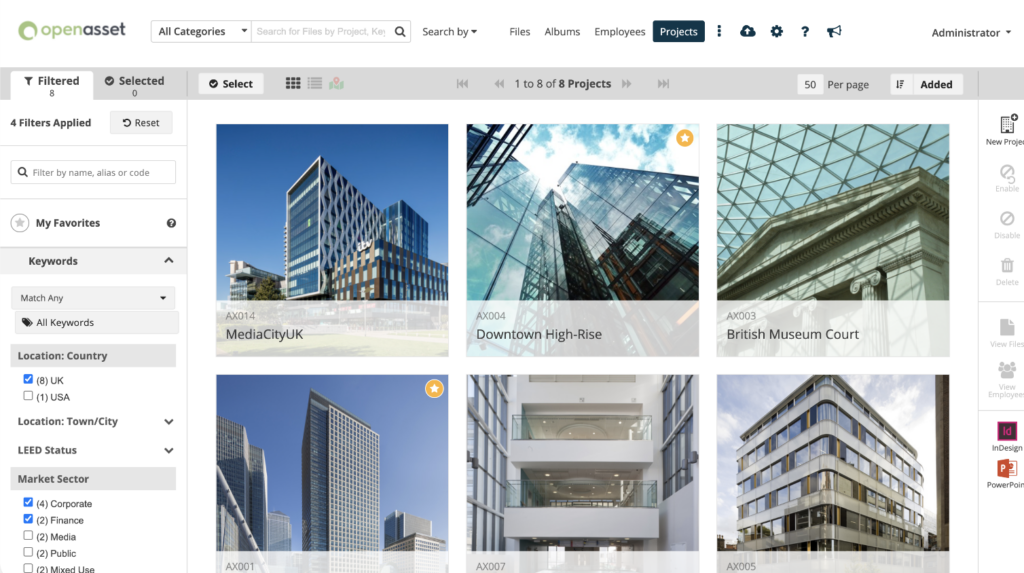
Choosing the right enterprise DAM software can transform how your organization manages and utilizes its digital assets. From enhancing productivity and brand consistency to ensuring compliance and improving collaboration, the benefits of an effective DAM system are substantial.
With tailored solutions designed to scale alongside your business, enterprise DAM systems provide the foundation needed to support long-term growth and efficiency.
As demonstrated by the real-world examples above, adopting a powerful DAM platform can lead to measurable improvements in workflow efficiency, cost savings, and overall operational performance.
Ready to explore how enterprise DAM software can drive better results for your organization? Discover more about how OpenAsset’s solutions can help your business achieve its goals and optimize your digital asset management strategy.
With over 10 years of content management experience, Janelle Poisel has a proven track record of crafting compelling narratives and delivering content that resonates with B2B audiences. She is dedicated to helping teams learn how to meet their audience with the right content, at the right place, and at the right time as they navigate their unique customer journeys.