







Categories: An easy way to enable different business units to utilize OpenAsset

Oct 1, 2015
1 min

Did you know other business units can store their images in OpenAsset?
We’ve written about the benefits of categories before, and how the use of categories enables your organization to manage different types of content within OpenAsset. Increasing the ownership of OpenAsset within an organization is a concept we believe in strongly. We encourage our clients to consider other business units in the organization that can ‘own’ a part of OpenAsset.
A default implementation of OpenAsset will contain the following categories; Project, Reference and Staff photos. It is possible to have a number of additional categories in your system (skip to the bottom of this article to see what other clients are doing with their categories).
There can be a risk to your digital asset management implementation if only one or two people in the organization have a deep understanding of the software. The key to a successful ongoing implementation of OpenAsset is the spreading of knowledge and ownership of OpenAsset within your business.
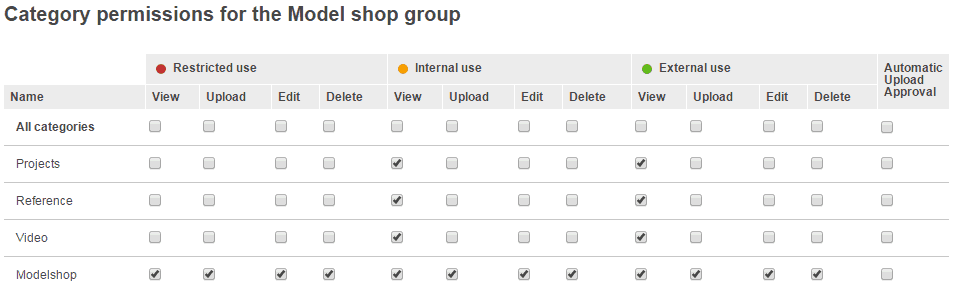
For example, by configuring groups and permissions it is possible to allow the Model Shop to own the Model shop catalogue, and allow this business unit to upload images into their category only. See screengrab below. It shows the category permissions configured for the Model Shop group.
Depending on your requirements, you can have a project based category or a non-project based category. If it is important for your images to be linked to particular projects, then a project based category is recommended to be used.
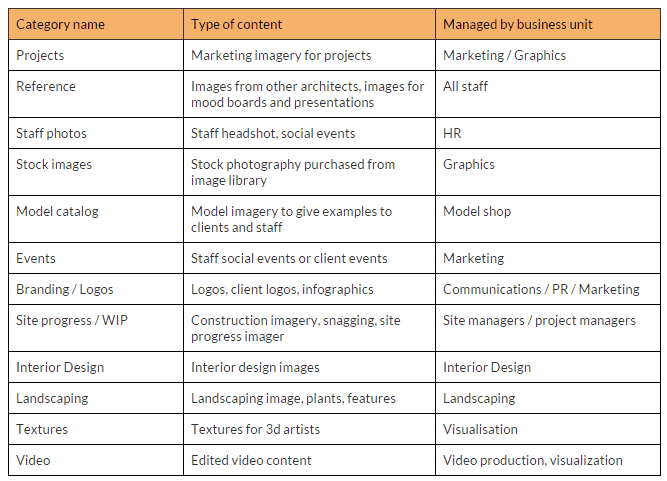
The following categories are most popular with clients. In many cases, different categories were ‘owned’ by a particular business unit in the organization.
If you would like a new category created, or want to discuss the benefits of creating multiple owners of image content in OpenAsset, please contact your Account Manager.
Landon Iannamico is a content marketing expert with 6 years of experience helping B2B SaaS brands tell their stories and establish their verbal identities. He specializes in crafting brand narratives and producing content that breaks down complex concepts for highly specific, knowledgeable audiences across the data, AI, and engineering industries.