






Digital asset management for AEC firms

Oct 9, 2026
6 min

Before Nitsch Engineering bought a digital asset management system, its two-person marketing team spent a couple of months doing something most firms skip: They tracked the hours. They logged how long it actually took to find a project photo and resize it for a submission.
Laurie Strickland, Director of Marketing at Nitsch Engineering, said:
“We knew it was a lot of time, but even we were surprised by how much time we were wasting finding and resizing images. Projecting that out with our hourly rates, we calculated that OpenAsset would pay for itself in the first year.”
— Laurie Strickland, Director of Marketing at Nitsch Engineering
Most firms evaluate digital asset management tools by their feature lists, but Nitsch Engineering cut to the heart of what all those features are for: saving time. Their whole job is to make life simple and manageable when you’re running at max capacity during peak proposal season.
If you’re having similar experiences, always losing hours to simple administrative tasks, you might want to consider one too.
What is digital asset management?
Digital asset management (DAM) is a system for storing, organizing, sharing, finding, and retrieving digital assets, including images, branding materials, proposals, and project photography. DAMs are designed to unify all of your scattered folders, Cloud databases, and the random files sitting on somebody’s desktop into a central library where every file can be easily organized and found.
For AEC (architecture, engineering, and construction) firms, DAMs are most useful as your company scales up. Once your marketing department’s day-to-day becomes more than one person can keep in their head, you need support tools capable of organizing your data so that projects and valuable media assets don’t fall through the cracks. It also helps stop team members from producing redundant or contradictory work.
They’re also useful for any company, AEC or not, with a long history — and the asset library that comes with it. With a powerful, organized DAM, it becomes easy to see what you already have at a glance, which in turn speeds up work. You can make faster creative decisions on current proposals by easily researching what worked last time and reliably finding assets you use over and over, like resumes.
For both types of companies, it can also reduce your workload by surfacing old media that even you forgot you had. Without it, you might spend an hour hunting through folders you haven’t looked at in a year, or worse, redo the work by making an entirely new asset! OpenAsset’s guides to the benefits of digital asset management and common DAM use cases go into more detail.
What AEC firms store, and why folder systems break at project scale
An AEC firm’s asset library holds professional project photography, renderings and visualizations, drone footage, as-built documentation, staff headshots and CVs, past proposals and qualifications packages, award submissions, and templates.
That’s a lot of different assets to keep track of, and as companies’ libraries balloon inside, they start running into the same common problems:
1. Time lost hunting for photos
Without a central server, files are only as organized as everyone at the company keeps them. That means they end up spread across a dozen different drives, servers, and your one disorganized coworker’s desktop screen. If you don’t already know where it is, it takes hours to find.
2. The same image exists in six sizes
A major contributor to this information bloat can be images with multiple versions. While it’s normal to need all of those sizes, it doesn’t make the process of finding what you’re looking for any faster when there are six copies of each photo to sift through.
3. Inter-office organization
For truly large companies with multiple offices, this becomes an even more acute problem. It’s one thing to have to figure out which corner of OneDrive your photo’s hiding in. It’s another to have to email someone in a different time zone and pray they get back to you in the next week.
4. Outdated materials
This gets particularly noticeable with resumes, which need to be periodically updated. If your company doesn’t automatically delete the old ones, you can find yourself staring at three copies of the same resume, wondering if there’s a fourth, even newer version hiding somewhere else.
DAMs make all of these situations more manageable. All the data is always in one place, so you never have to worry whether the file you’re looking for is lurking somewhere you can’t access it. And many DAMs are constantly releasing newer and better search functions that help you find what you need as quickly as possible.
Six criteria for evaluating a DAM at an architecture, engineering, or construction firm
With so many DAMs on the market, there’s a lot to sift through to find the one that’s right for you. When considering multiple DAMs, these basic criteria will tell you whether those tools are compatible with your company.
1. File type compatibility
Bare minimum, the tool needs to support all file types you commonly use. Most DAMs can work with all common file types, but if you have a niche one that’s important to your work, this is important to ask about.
For example, AEC firms often need to store Adobe InDesign files, or CAD and BIM-based file types like DWG, RVT, SKP, and IFC. You will always know your company’s specific needs best. Other common features to look for are image scaling and file type conversions.
2. Integrations
One of the most important things to check with any new software is whether it communicates with your existing tools, and how. While not a dealbreaker, it gets a lot harder to implement tools that don’t directly communicate together.
Without these integrations, you’ll often find yourself filling in the same data in multiple places or taking extra time to manually transfer information from one program to another.
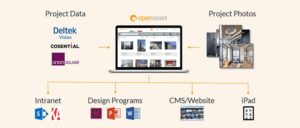
Most DAMs will have some form of integration for common tools like Adobe or Microsoft products, but far fewer have connectors for niche industry-specific tools like Deltek, Unanet, or Procore. For a closer look at which connectors to prioritize, see the most important DAM integrations.
3. Industry focus & information architecture
Most DAMs are built to be general-purpose and serve multiple industries. The biggest reason this matters is that it impacts the way files are stored and organized.
Acquia, for example, targets marketing departments and advertises file organization by brand and campaigns, while Canto is focused on retail and CPG, and assumes you’ll be using it to store a product catalogue. Others are even more general and simply offer basic file storage and management.
General tools are flexible, but you’ll spend time configuring them to fit how your firm works. An AEC-specific DAM that organizes assets by project and understands the asset categories you work with will require much less configuring.
4. Headline features
In addition to claiming an industry niche, most DAMs have developed a few unique features to make themselves stand out.
For example, Bynder offers AI search that finds visually similar assets, while Brandfolder leans into creative workflow tools for managing assets through review. OpenAsset DAM connects with OpenAsset Shred, an AI proposal creation platform, so that your assets can be leveraged to draft proposals. If a feature solves a problem you run into every week, take note.
5. Security
Many DAMs maintain several security certifications to prove your data is safe with them. This point is increasingly important in an AI world, where handing information over to a company’s AI means handing information to that company. It’s important to partner with a company that treats your data with respect instead of spreading it around the internet or using it to train external AIs.
6. User access
Does the software accommodate your company’s policies? Some companies let employees work from home, or even other countries, and need Cloud access to function. Others can’t afford an outage or work with sensitive information and are willing to trade convenience for an on-premise DAM they have more control over.
7. Cost
Cost is always an important factor to consider. Different tools have different payment structures, so be sure to talk to a sales rep to understand how their structure works. Also ask how much it will cost to migrate your existing data to the new system.
To give you an idea of how these considerations work in action, we’ve put OpenAsset side by side with some industry-leading DAMs, as well as Microsoft SharePoint, which isn’t necessarily a DAM, but some smaller companies use as a budget option to accomplish some of the same goals.
It’s important to note that these are just a select few examples. The DAM industry is both broad and varied, and this is not the end-all, be-all list of options. You should still pursue your own research.
| Criterion | OpenAsset | Bynder | Brandfolder | SharePoint |
| File compatibility | OpenAsset works with all common file types, as well as the files AEC marketers use most often. Full list of file types here. OpenAsset also offers image scaling. | Bynder works with all file types, but only has full functionality for some. This article explains Bynder’s system. They also offer image scaling. | Brandfolder works with all common file types, with a large list of file conversion and image scaling options. | Microsoft’s products work with all common file types. Full list of file types here. |
| Integrations | OpenAsset partners with common creative studios like Adobe and Microsoft, as well as AEC industry standbys like Deltek, Unanet, and Procore. Full list here. | Bynder has 167 integrations, but not Deltek, Unanet, or Procore. Full list here. | Brandfolder features numerous integrations across several fields of software, but not Deltek, Unanet, or Procore. Full list of integrations here. | SharePoint features limited connectors, and only with other products inside the Microsoft product suite. |
| Industry focus & information architecture | Built for AEC. Assets are organized by project and employee, with AEC asset categories built in. | General purpose, aimed at brand and marketing teams. Assets are organized through a configurable taxonomy you set up yourself. | General purpose, aimed at brand and marketing teams. Assets are organized by brand, with collections for grouping. | General purpose document management, not a dedicated DAM. Files are organized in folders and document libraries. |
| Headline features | Connects with OpenAsset Shred, an AI proposal platform that uses your assets to draft proposals. Detailed employee profiles that can be used for resumes. AI-powered search functions that can tag faces with facial recognition and find assets with pattern recognition. | AI-powered search functions that can discover assets based on their visual similarity. | Broad reformatting tools for managing individual assets. Creative workflow tools to organize the asset development process. | Integrated into the larger Microsoft ecosystem. Provides a “DAM-lite” solution halfway between company folders and a full-power DAM. |
| Security certifications | SOC 2 Type II, GDPR, NIST RMF-aligned. | SOC 2 Type 2, ISO 27001, ISO 27018, ISO 22301. GDPR, CCPA, HIPAA compliant. | SOC 2 Type 2, ISO 27001. | The full Microsoft suite maintains consistent certifications, including SOC 2 Type 2 and ISO 27001. |
| User access | OpenAsset is Cloud-based only. It is usable on mobile, but does not have a dedicated app. It can be used offline, though some functions will be limited. | Bynder is Cloud-based only. It has a mobile app. The mobile app has an offline mode. | Brandfolder is Cloud-based only. It is usable on mobile, but does not have a dedicated app. It does not have an offline mode. | SharePoint is Cloud-based only. It has a mobile app, but cannot be used offline. |
| Cost | Quote only. Cost on a sliding scale depending on number of users and how much data storage is required. You can access an ROI calculator here. | Quote only. | Brandfolder uses two different pricing plans depending on your needs. Both are quote only. Full details here. | Sold as a package with common Microsoft products. If you use Microsoft Word or similar tools, you likely already have it. Plans begin at $7/license. Full pricing page |
What DAM software costs for an AEC firm
Most DAMs have variable pricing based on the size of your company, and so offer personalized quotes instead of standardized pricing. There are several factors that go into what digital asset management costs, including number of users, storage size, and labor for migrating files. To weigh that cost against the hours a DAM saves, the way Nitsch Engineering did, see how to measure DAM ROI.
Frequently asked questions
What is the difference between a DAM and a CMS?
A digital asset management system stores and organizes source files; a content management system helps create and publish content to a website. The two are complementary, and many firms run both. OpenAsset covers the distinction between DAM and CMS in more depth, and separately how DAM differs from media asset management (MAM).
Is Google Drive or Dropbox enough?
Cloud storage handles sync and sharing, but it files each asset in one folder location and has no project-based metadata model, so it cannot answer detailed searches like “show me every healthcare project in Texas photographed after 2023.”
Detailed comparisons with OpenAsset are available for Google Drive and Dropbox.
Can SharePoint work as a DAM?
SharePoint can be configured into something DAM-like, but this is not its intended purpose. The configuration process can be time-intensive and cost-prohibitive compared to buying a tool that does what you need out of the box.
What is open source digital asset management?
Open source DAM means the source code is publicly available and the user community can extend it. The licence is free, but the total cost is not: someone has to host it, secure it, update it, and support your users. It suits firms with in-house IT capacity and time to spend.
How long does implementation take?
It depends mostly on scope: the size of your image library, how many offices and users you’re onboarding, and how much custom work the rollout involves, such as InDesign templates, integrations, or data migration. As one benchmark, WilkinsonEyre’s Employee Module rollout ran about four months end to end, covering data migration, custom InDesign template development, and a two-stage launch. A smaller, single-purpose setup can move faster; a large, multi-office rollout with heavy customization takes longer.
Does OpenAsset handle CAD and BIM files?
OpenAsset DAM’s documented asset types are project photography, renderings, documents, employee records, and text content. CAD drawing and BIM model management is not among them, however, a workaround is available by storing such files in their authoring platform or a document-management system and then linking them within OpenAsset DAM.
What is the best DAM for an AEC firm?
The best DAM for an AEC firm depends on your personal needs. How large is your company? Do you work with industry staple software like Deltek or Procore? Do you primarily deal in government contracts, or mostly commercial work?
Tools like OpenAsset DAM are built with many of these considerations in mind. After 20+ years working in the AEC field, we’ve built our DAM to address the common problems AEC firms run into when trying to use general DAMs. To learn more about whether OpenAsset DAM is a good fit for your firm, book a demo with our sales team.
Landon Iannamico is a content marketing expert with 6 years of experience helping B2B SaaS brands tell their stories and establish their verbal identities. He specializes in crafting brand narratives and producing content that breaks down complex concepts for highly specific, knowledgeable audiences across the data, AI, and engineering industries.