







Introducing Drag & Drop for InDesign in Shred.AI’s Proposal Studio

Apr 15, 2026
1 min

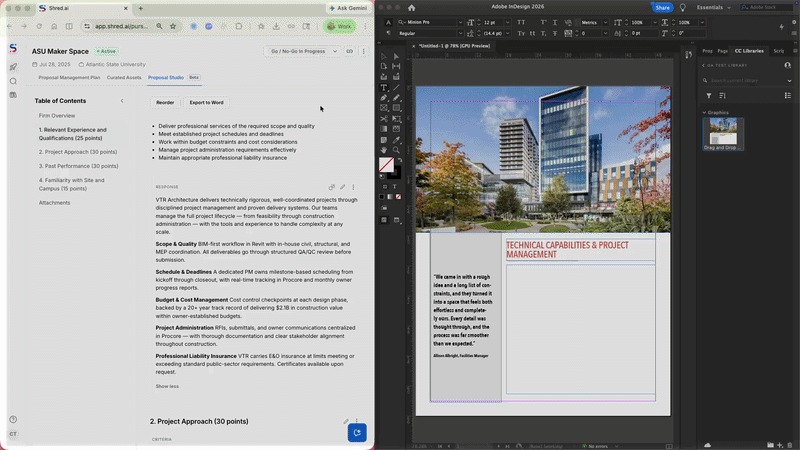
We’re excited to announce a new way to streamline your proposal writing process: Shred.AI Drag & Drop for InDesign. With this feature, you can seamlessly drag content from Shred.AI’s Proposal Studio directly into InDesign—no more time wasted fussing with formatting and wonky transformations.
What it does
With this feature, you can seamlessly drag any text-based content block from Shred.AI’s Proposal Studio directly into an open InDesign document and have it match your document’s style and formatting.
- One-step transfer: Simply hover over the drag handle, click and hold, and drop it into a text frame, no copy and paste required.
- Automatic style matching: The dropped text overrides the rich-text styling from Proposal Studio (headings, bolds, italics, etc.) and automatically inherits the text styles applied to the destination frame of your InDesign document. The font size, weight, spacing, etc., set by your InDesign template will be applied without any extra work.
- No plug-in needed: Shred.AI’s Proposal Studio now includes this feature by default. You don’t have to download any additional software or plug-ins.
Why you’ll love it
Shred.AI’s Proposal Studio is all about removing busy work so you can focus on crafting winning proposals. With Drag & Drop for InDesign, you’ll save even more time.
- Intuitive interface: Simply drag and drop your content block, and you’re done. No configuring, learning curve, or troubleshooting necessary.
- Eliminate manual clean-up: With automatic style matching, you save time by eliminating the need to adjust font size and style manually.
- Frictionless workflow: Reformatting, switching between tools, and copying and pasting all add up to interrupt your workflow. With a direct connection between content creation and production, you can work with more focus and intention.
- More efficient process: Time saved on manual cleanup means you can achieve a faster turnaround on pursuits without sacrificing quality.
Ready to give it a try?
Shred.AI Drag & Drop for InDesign is now available to all Shred.AI clients. To try it out, simply log in to your Shred.AI account and navigate to the Proposal Studio. To learn more or ask further questions, contact our Customer Success team at [email protected].
Eric Liou is the Chief Product Officer at OpenAsset, where he leads product vision and strategy across product management, design, and AEC marketing innovations. With extensive experience in product leadership, he has built a strong track record of advancing AI-driven solutions that enhance efficiency, collaboration, and impact for industry professionals.
At OpenAsset, Eric is focused on building tools that streamline workflows and empower AEC firms to succeed in an evolving landscape. He is passionate about the intersection of technology and user experience, and is committed to delivering the next generation of AI-powered solutions tailored to the unique needs of AEC professionals.